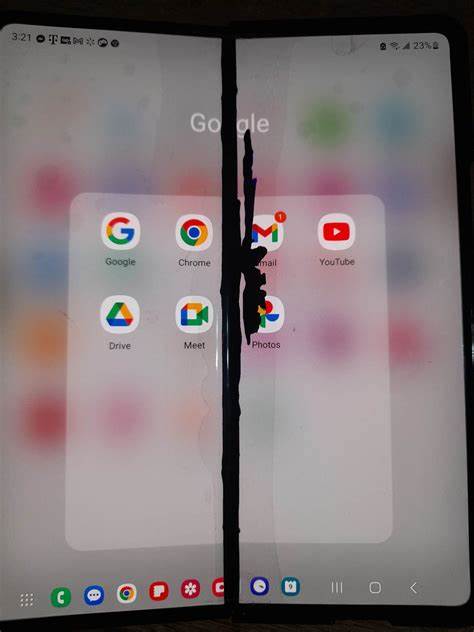
The Samsung Galaxy Z Fold series has amazed users with its foldable screen and futuristic design. But like all tech, it’s not without flaws. A common and frustrating issue is the appearance of a black vertical line across the foldable display — often a sign of dead pixels, display connector failure, or screen pressure damage.
If you’ve noticed this strange black line ruining your experience, don’t worry. This guide breaks down the causes, fixes, and smart steps to prevent permanent damage to your precious Galaxy Z Fold.
📉 WHAT CAUSES THE BLACK LINE ON GALAXY Z FOLD SCREENS?
Several possible reasons can cause a black line or dead pixels on your Samsung foldable phone:
- Dead Pixels: Tiny areas of the screen that no longer display anything, usually caused by pixel hardware failure.
- Display Cable Damage: The folding design puts strain on internal connectors, which can loosen or get damaged over time.
- Screen Burn or Pressure Points: Applying too much pressure at the fold or dropping the device may cause internal cracks or pixel burnout.
- Manufacturing Defect: In some cases, it’s just a bad unit that needs warranty service.
🔧 HOW TO FIX THE BLACK LINE OR DEAD PIXELS
Here are the steps you can take depending on the condition of your screen:
1. Restart the Phone
Sounds basic, but restarting can sometimes refresh the display connection if it’s a temporary software glitch.
2. Try a Pixel Fixing App
Apps like Dead Pixel Detect and Fix (available on Play Store) flash RGB colors rapidly to attempt reviving stuck or dead pixels. It doesn’t always work, but it’s worth a shot.
3. Use Gentle Pressure Technique (CAUTION)
Some users try massaging the screen with a soft cloth to “wake up” pixels. Be extremely careful — too much pressure could make it worse. This is risky and not recommended unless you understand what you’re doing.
4. Enter Samsung Diagnostics Mode
Dial *#0*# to open Samsung’s hidden diagnostic mode. Tap Red, Green, and Blue to test for dead pixels. If the black line persists in all tests, it’s a hardware issue.
5. Visit a Samsung Authorized Service Center
If your Z Fold is still under warranty or Samsung Care+, take it to a certified repair center. Samsung often replaces the screen for free if it’s a known defect. Don’t risk third-party repairs on foldable displays.
💡 TIPS TO PREVENT FUTURE SCREEN DAMAGE
- Always close your Z Fold gently and avoid pressing near the hinge.
- Don’t store it in tight jeans pockets where bending pressure increases.
- Use an official Samsung case to protect the screen and hinge area.
- Avoid exposing it to heat, moisture, or sudden drops.
Remember, foldable phones are fragile and still evolving. Handle them with care to keep the flexible OLED looking sharp.
❓ WHAT IF IT’S NOT A HARDWARE ISSUE?
Sometimes, a black line may appear due to:
- Software bugs after an update
- Incompatible third-party apps affecting display rendering
- Temporary glitches after overcharging or overheating
In such cases, try:
- Updating your software to the latest version
- Uninstalling suspicious apps
- Clearing cache via recovery mode
- Performing a factory reset (as a last resort)
🛠️ FINAL WORD: GET IT CHECKED IF IT’S SERIOUS
Foldables like the Z Fold are awesome, but they come with sensitive tech. If you’re seeing a stubborn black line that won’t go away after resets or pixel fix attempts, your best bet is to contact Samsung Support.
They may offer a free screen replacement or repair under warranty or Samsung Care+. Attempting to fix it yourself could void your warranty and worsen the problem.
Author: Israel
Blog: CodersBlog – Deep Dives into the Future of Mobile Tech





 codersblog.com
Leave a comment