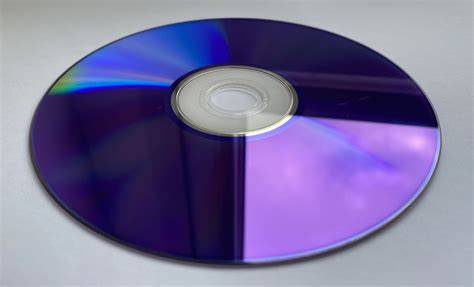
This article is part of our ongoing series expanding on STORAGE DEVICES: A GENERAL OVERVIEW OF INVENTION, TYPES, AND FUNCTION. Following our detailed look at MAGNETIC STORAGE DEVICES, we now turn to OPTICAL STORAGE DEVICES, examining their technology, types, advantages, and common uses.
WHAT IS OPTICAL STORAGE?
Optical storage devices store data by using laser light to read and write information on optical discs such as CDs, DVDs, and Blu-ray discs. Data is encoded as tiny pits and lands on the surface of the disc, which affect the reflection of the laser light to represent binary data.
HISTORY AND DEVELOPMENT
Optical storage technology began gaining popularity in the 1980s with the introduction of the Compact Disc (CD), initially designed for audio playback but soon adapted for data storage. The development continued with DVDs in the late 1990s, which offered higher capacity, followed by Blu-ray discs in the 2000s that increased capacity even further by using shorter wavelength lasers.
HOW OPTICAL STORAGE DEVICES WORK
Data on an optical disc is arranged in a spiral track starting from the center and moving outward. A laser beam in the optical drive reads the disc by detecting changes in reflectivity caused by pits (indentations) and lands (flat areas). Writing data involves a laser altering the surface to create these pits. The drive’s optical pickup unit converts these optical signals back into digital data.
TYPES OF OPTICAL STORAGE DEVICES
- Compact Discs (CDs): Primarily used for music and small data files; typical capacity is around 700 MB.
- Digital Versatile Discs (DVDs): Used for video, software, and larger data storage; capacity ranges from 4.7 GB (single-layer) to 8.5 GB (dual-layer).
- Blu-ray Discs (BDs): Designed for high-definition video and large data files; capacities vary from 25 GB (single-layer) to 50 GB (dual-layer) and beyond.
ADVANTAGES OF OPTICAL STORAGE
- Durability: Resistant to magnetic fields and some physical wear.
- Portability: Lightweight and easy to transport.
- Compatibility: Widely supported by many devices over the years.
- Cost-Effective for Distribution: Ideal for distributing media like music, movies, and software.
DISADVANTAGES OF OPTICAL STORAGE
- Limited Storage Capacity: Lower capacity compared to modern HDDs and SSDs.
- Susceptible to Physical Damage: Scratches, fingerprints, and heat can degrade data integrity.
- Slower Access Speeds: Compared to magnetic and solid-state storage.
- Decreasing Usage: Being replaced by digital downloads and cloud storage.
EXAMPLES OF OPTICAL STORAGE DEVICES
- CD-ROMs and CD-RWs: Common for music and early data storage.
- DVD-ROMs and DVD-RWs: Widely used for video and software distribution.
- Blu-ray Discs: Popular for HD video and large data backups.
CONCLUSION
OPTICAL STORAGE DEVICES have been crucial in the evolution of data storage and media distribution. Though gradually being superseded by newer technologies, they still serve important roles in archival storage and media playback.
This article builds upon the broad concepts introduced in STORAGE DEVICES: A GENERAL OVERVIEW OF INVENTION, TYPES, AND FUNCTION and the detailed insights into MAGNETIC STORAGE DEVICES. Next, we will explore SOLID-STATE STORAGE DEVICES and their growing impact on the storage landscape.
Stay tuned for the next installment!




 codersblog.com
Leave a comment