This article continues our exploration of storage technologies, building on STORAGE DEVICES: A GENERAL OVERVIEW OF INVENTION, TYPES, AND FUNCTION, as well as detailed looks at MAGNETIC STORAGE DEVICES and OPTICAL STORAGE DEVICES. Here, we focus on SOLID-STATE STORAGE DEVICES, which are rapidly transforming how data is stored and accessed.
WHAT ARE SOLID-STATE STORAGE DEVICES?
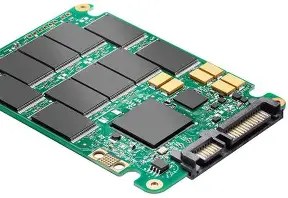
Solid-state storage devices store data on flash memory chips that have no moving parts. Unlike magnetic or optical storage, they use electronic circuits to retain data, making them faster, more durable, and more energy-efficient.
HISTORY AND EVOLUTION
Flash memory was invented in the 1980s, but solid-state drives (SSDs) became widely popular only in the late 2000s and 2010s as prices dropped and capacities increased. They have since become the preferred storage medium for many computing devices.
HOW SOLID-STATE STORAGE DEVICES WORK
Data in SSDs is stored in interconnected flash memory cells that can be electrically programmed and erased. This allows near-instant access to stored data without the latency caused by moving parts in traditional drives.
TYPES OF SOLID-STATE STORAGE DEVICES
- SATA SSDs: Replace traditional hard drives, offering faster speeds while using the SATA interface.
- NVMe SSDs: Use the PCIe interface for significantly higher data transfer speeds.
- USB Flash Drives: Portable solid-state memory devices commonly used for data transfer.
- eMMC and UFS Storage: Embedded storage solutions used in smartphones and tablets.
ADVANTAGES OF SOLID-STATE STORAGE
- Speed: Much faster read/write speeds compared to magnetic and optical storage.
- Durability: No moving parts mean less risk of mechanical failure.
- Energy Efficiency: Consume less power, extending battery life in portable devices.
- Silent Operation: No noise from mechanical movement.
DISADVANTAGES OF SOLID-STATE STORAGE
- Cost: Generally more expensive per gigabyte than magnetic storage.
- Limited Write Cycles: Flash memory cells degrade after a number of writes, though modern wear-leveling extends lifespan.
- Data Recovery: More difficult and costly compared to magnetic drives.
EXAMPLES OF SOLID-STATE STORAGE DEVICES
- Samsung 970 EVO NVMe SSD: Popular high-performance internal drive for PCs and laptops.
- Crucial MX500 SATA SSD: Affordable, reliable SSD for desktop and laptop upgrades.
- SanDisk Ultra USB Flash Drive: Portable storage for everyday file transfers.
- Apple’s SSDs in MacBooks and iPhones: Integrated solid-state storage providing fast access and reliability.
CONCLUSION
SOLID-STATE STORAGE DEVICES represent the cutting edge in storage technology, combining speed, durability, and efficiency. They complement and, in many cases, are replacing traditional magnetic and optical storage in everyday computing.
For a broader understanding, revisit STORAGE DEVICES: A GENERAL OVERVIEW OF INVENTION, TYPES, AND FUNCTION as well as our prior deep dives into MAGNETIC STORAGE DEVICES and OPTICAL STORAGE DEVICES. Stay tuned for future articles exploring emerging and specialized storage technologies.
Thanks for following the series!





 codersblog.com
Leave a comment